
How to Audit Supplier Auto-Renewals (So They Don’t Catch You by Surprise)
Tom Mills once lost his company $300k to a missed auto-renewal—and admits he still panics enough to double-check contracts in the middle of the night. Here’s his six-step audit to catch renewals before they catch you.

Want more content like this? Sign up for our monthly newsletter.
Ask any procurement professional about the clauses that keep them up at night and they’ll probably answer: Auto-renewals.
These contract clauses are meant to be convenient. And it can be, if you’re happy with the terms or the product.
But if it’s not working…miss the auto-renewal date, and you’re stuck with the same supplier for another year or more. It’s one key reason why a reported 8.6% of annual spend is lost to “contract value leakage,” according to research conducted by the World Commerce & Contracting Association (WCC) in partnership with Deloitte. Beyond the financial impact of this mistake, you’re also opening the business up to significant risk.
Auto-renewals have made Tom Mills of Procure Bites paranoid at times. “I have woken up in the middle of the night, logged on to my laptop, and double checked an upcoming renewal date in a panic,” he laughs. “I recognize that this is unhealthy, but I’ll never forget a mistake I made with an auto-renewal that cost my company $300k.”
If you want to avoid getting caught by surprise, you’ll need visibility into your supplier contracts, first. In this post, we’ll talk through how to audit your contracts to find those key renewal dates, how to prioritize them, and how to make sure you never miss an auto-renewal again.
Set the scope of your supplier auto-renewal audit
First, you’ll need to set the scope for your audit. If you have contracts in several different places, for example, you may want to choose one repository at a time, or one business unit at a time, depending on bandwidth.
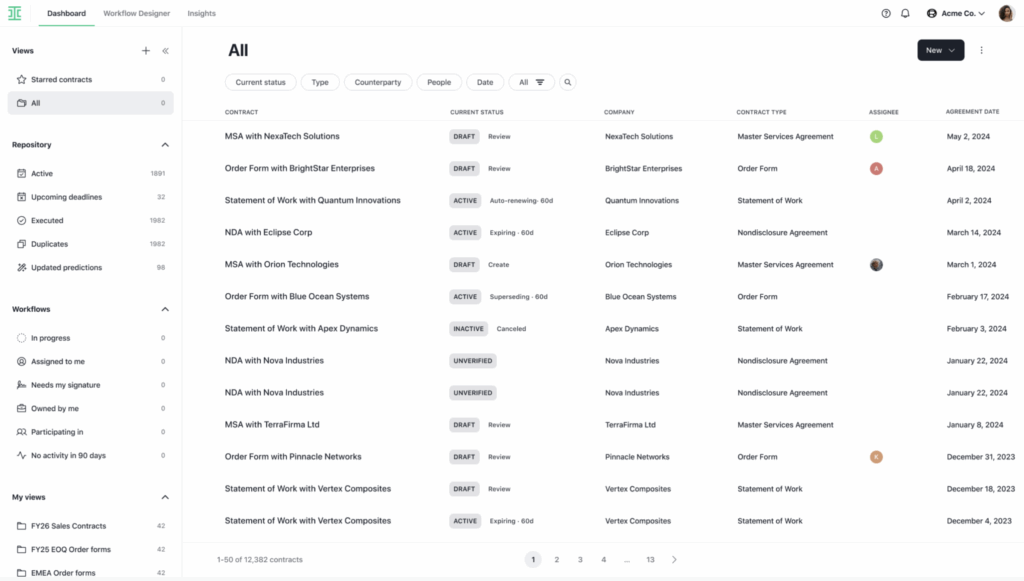
Ideally, though, you’re working with a set amount of contracts that exist in a contract lifecycle management system, or CLM. This corrals all the important contracts in one system and makes them searchable. This way, you can easily see exactly what’s going on with your contracts and what’s up for auto-renewal next.
Guide your audit with these three questions:
- Which suppliers do we have auto-renewal agreements?
- Of these, which contracts are the highest spend?
- And most importantly: Which ones are renewing in the next 90 days?
That’s what you hope to answer through the course of the next 90 days.
Pull the contracts with upcoming auto-renewals to begin your analysis
Now, it’s time to actually pull the contracts—Master agreements, order forms, SOWs, or renewal notices—that have auto-renewals. You need a clean list of vendors with open contracts, filtered by auto-renewals. You can do this in two different ways with a CLM:
- Start off by importing your files by record type so that everything has a digital record, if you haven’t already. Make sure these files are tagged by vendor name, supply category, department, contract date, renewal date, and so on. This is a critical step if your contracts aren’t all in one place.
- With existing contracts, look specifically for auto-renewal clauses. Download these into a .CSV or Excel file. We’ll start prioritizing them in the next step.
This step is the most time-intensive because it requires all of your contracts to be in one place. But if you’re still struggling, you’re not alone. “The most common complaint I hear from customers is, ‘My contracts are all over the place,’ says Toby Laforest, Ironclad’s former Senior Director of Product Marketing. “They may have acquired a new company, or restructured their business, or it’s a homegrown system with multiple business units. For these folks, they need to start by understanding what is in their contracts in the first place so they can have a clean list of vendors with open contracts.”
Flag auto-renewal clauses and build a tracker so you’ll know what’s coming up
This is where a CLM is invaluable for the process. A smart CLM can assign a status to the contract and alert you when there’s a renewal clause and when that auto-renewal date is coming up. This is the #1 use case procurement professionals use artificial intelligence, according to our State of AI in Procurement Report.
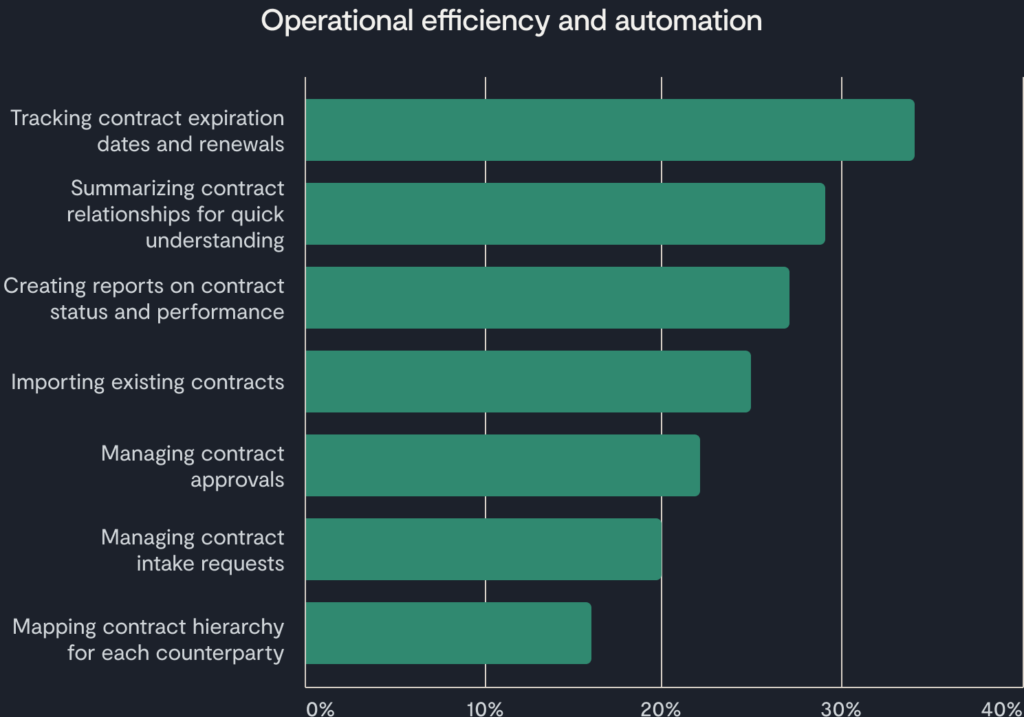
Source: State of AI in Procurement 2025
From there, you can create a filtered dashboard so you can easily track which renewals to pay attention to first.
IMAGE – DASHBOARD
Then, it’s time to prioritize which auto-renewals to focus on first. Start with the renewal date and the notice deadline over the next 90 days as your first pass.
Review each high-priority auto-renewal and make recommendations
Now, go through each contract by date. To determine which ones you’ll actually want to re-negotiate, filter one step further by:
- Current spend and price escalation on renewal, if applicable
- Existing vendor relationship status and current satisfaction with vendor
- Whether or not this vendor supplies a mission-critical service/product or if it’s a nice-to-have
- Whether or not the contract can be terminated without cause, and what notice requirements exist
- Exit costs and transition assistance should you move forward with another supplier
Then, make your recommendations for your team for each one. Will you monitor the agreement and return later, renew as-is, re-negotiate your terms, or exit the agreement and replace with another vendor?
Start taking action on upcoming auto-renewals
Now that you’ve chosen which contracts you’re going to move forward with, it’s time to go one level deeper on those agreements. Identify your desired contract changes if you’re re-negotiating. Consider factors like pricing adjustments, scope changes, performance expectations, or contractual terms.
This is the moment to bring in the rest of your team. You’ll likely need legal review, security and IT review, buy-in from the business owner, and to prepare a financial report before you can actually move forward initiating re-negotiations or cancellations.
Make this audit process repeatable for your team
Once you’ve completed your audit, it’s time to reflect on the process. What went well, and what could be improved? If you were stuck chasing down contracts and missing data all over the place—or had to spend hours manually digitizing them—that’s an area that’s easily solved with the right CLM.
Contracts touch so many aspects of your business that it may be helpful to create a stakeholder map for your team in the future, especially if there’s a point person in each business unit to address concerns about their relevant contracts. Re-negotiating a critical piece of infrastructure, like Salesforce for your sales team, won’t be the same process as evaluating a smaller, low-cost tool.
Write down any learnings and pressure-test your tracker to make sure that it’s working so you don’t have to do this process all over again next quarter.
Stay up-to-date on your auto-renewals

Depending on how you’ve set it up in your CLM, you can use the dashboard you’ve created to continue to monitor upcoming auto-renewals so you never get taken by surprise. In Ironclad, for example, you can see all of the contracts with upcoming deadlines and then create an email notification for it to let stakeholders know an auto-renewal is coming up in the next 30 or 60 days.
Organizations using Ironclad saw an average 55% improvement across value metrics, according to The 2025 Contracting Benchmark Report. It helps organizations stay on top of their contract renewals and ensures a proactive approach to maintaining ongoing business relationships. If you’re curious how to set up your own auto-renewal tracker within Ironclad, talk to our team today.
Ironclad is not a law firm, and this post does not constitute or contain legal advice. To evaluate the accuracy, sufficiency, or reliability of the ideas and guidance reflected here, or the applicability of these materials to your business, you should consult with a licensed attorney.