


Want more content like this? Sign up for our monthly newsletter.
The biggest shift in legal AI isn’t that it can review contracts. It’s the ability for AI to understand how your legal team negotiates contracts.
For most legal teams, Microsoft Word is still where contracts get negotiated. Lawyers draft, review, and redline agreements there every day, and even contracts managed in a CLM spend much of their working life in it.
That reality shaped how we built Ironclad Jurist for Microsoft Word.
While many AI contract tools can summarize content and suggest edits within Word, sophisticated legal work depends on deeper organizational context: your approved positions, fallback language, negotiation standards, and internal playbooks.
Today, we’re announcing the general availability of Ironclad Jurist for Microsoft Word. Ironclad Jurist for Word is AI drafting, redlining, and contract risk analysis that’s grounded in your legal team’s playbooks and connected to the system of record behind your contracts.
Jurist works directly inside Microsoft Word, enabling legal teams to review and negotiate agreements without changing how they already work. Connected to Ironclad, Jurist can deliver redlines and guidance informed by your organization’s approved language and negotiation standards, helping legal teams move faster on complex agreements while staying aligned with company policy.
Ironclad Jurist isn’t just AI embedded in Word. Combined with the organizational knowledge and workflows managed in Ironclad, it helps bring enterprise legal teams’ negotiation practices directly into the review process.
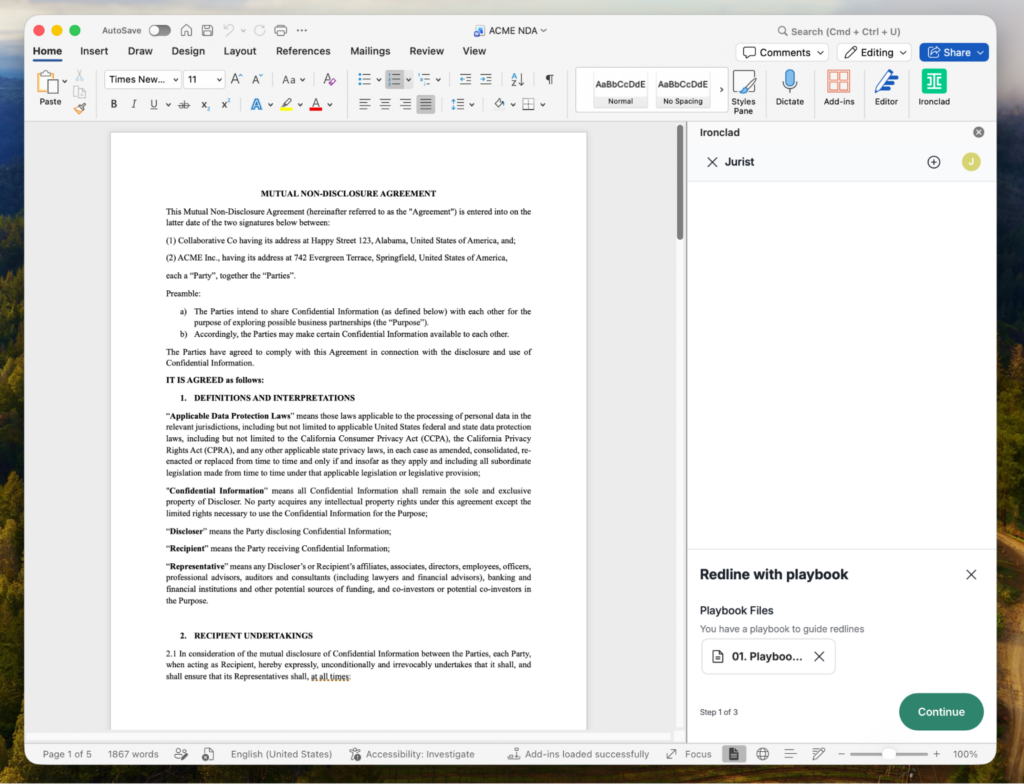
Bringing AI into the middle of the negotiation
The goal wasn’t to recreate Word inside another product or layer generic AI on top of documents. It was to make AI genuinely useful during the actual work of reviewing and negotiating contracts.
For instance, when you open a document in Word,Jurist can generate an immediate summary of the agreement, including: key obligations, unusual provisions, major dates, and the overall structure of the deal. The kind of orientation that usually requires a careful first read.
As lawyers move through the contract, Jurist can identify provisions that deserve attention, whether that’s missing indemnification caps, aggressive liability language, or non-standard termination terms. The point isn’t to negotiate contracts in the abstract, rather it’s designed to work within and according to your company’s protocols. This helps legal teams focus on what is actually material.
Jurist also brings playbook-driven redlining directly into Word. Instead of relying on memory or generic fallback language, lawyers can apply preferred positions grounded in their organization’s documented negotiation strategy. Suggested edits include supporting rationale, and attorneys can move between preferred and fallback positions directly within the workflow.
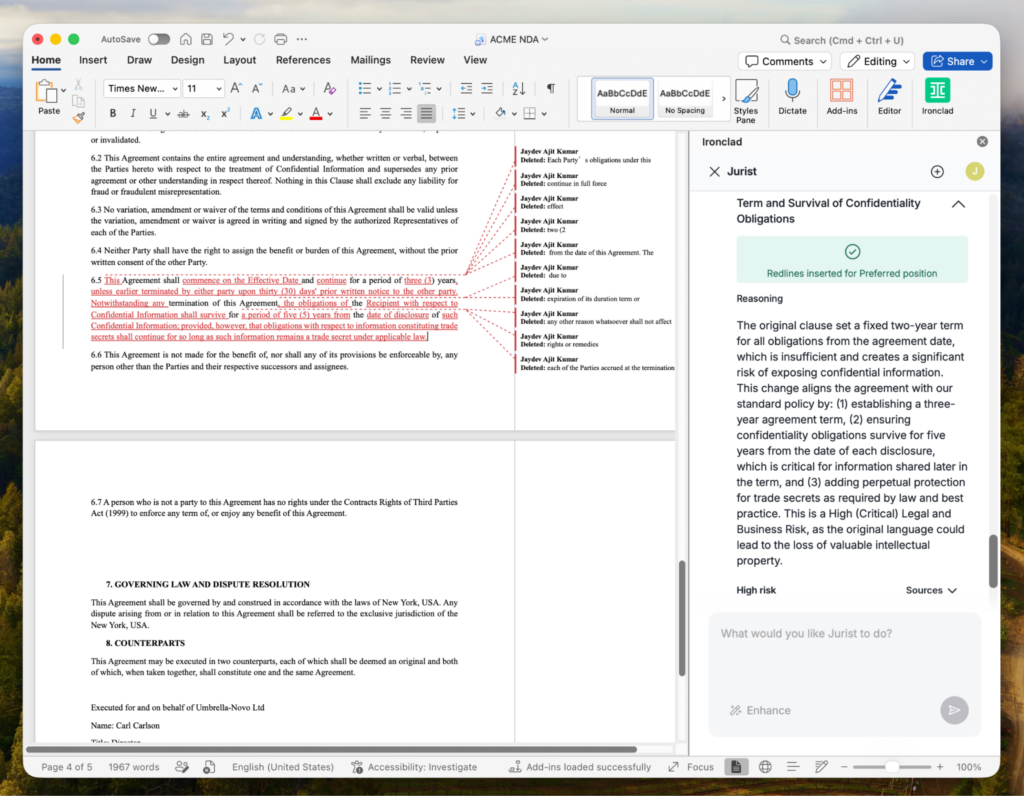
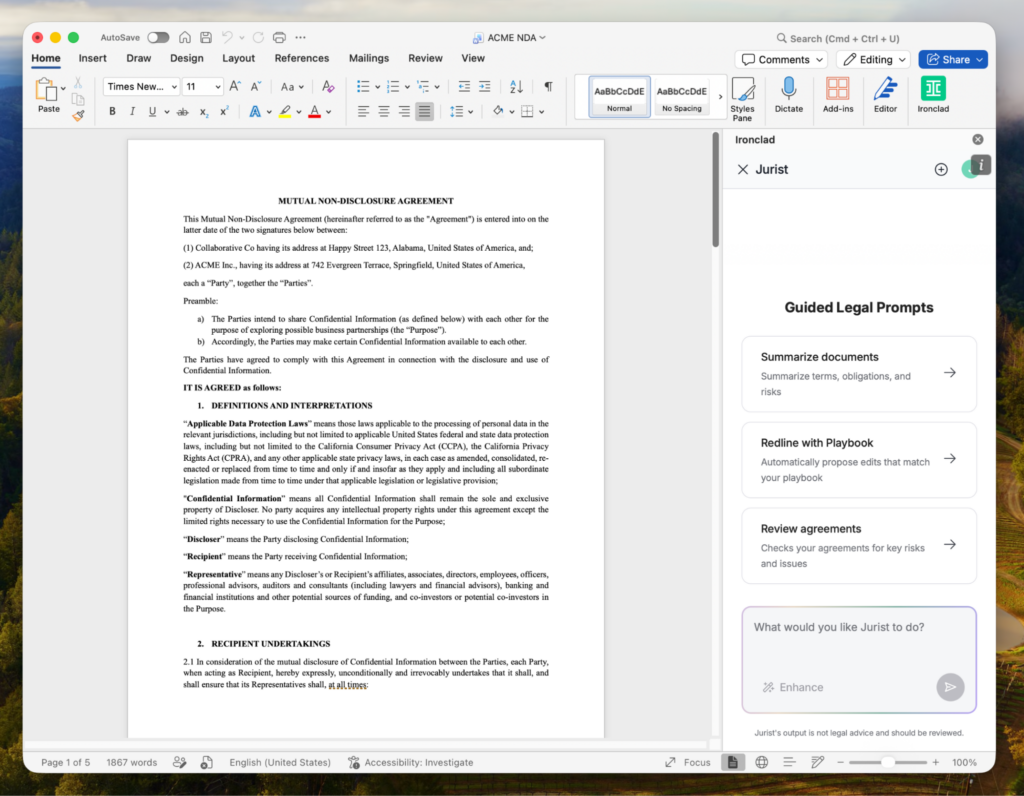
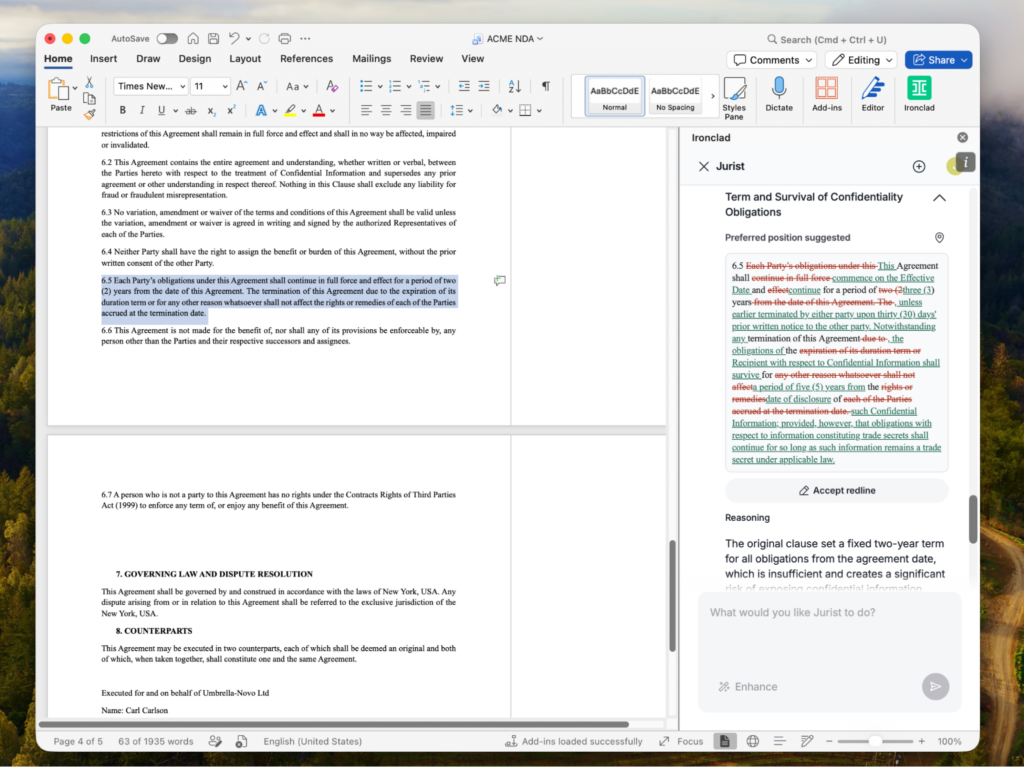
There’s also a conversational layer built into the experience. Lawyers can ask questions about the agreement in front of them, how a clause compares to standard language, why a redline was suggested, or what a specific provision means in context, plus receive responses grounded in the actual contract.
Built to work on any contract
One of the most important design decisions behind Jurist in Word is that it can assist with any document opened in Microsoft Word. It’s not limited to contracts stored in Ironclad or company templates. Whether you’re reviewing counterparty paper, legacy agreements, or third-party contracts, Jurist can help lawyers summarize, analyze, and review the document directly within Word.
That flexibility matters because legal work rarely happens inside a single system. Lawyers constantly move between negotiations, counterparties, and document versions. AI becomes much more useful when it can move with them, instead of requiring every contract to live in a specific repository before the technology becomes usable.
When connected to Ironclad, Jurist can also draw on approved language, negotiation history, and internal playbooks to deliver guidance that’s tailored to how your organization negotiates.
When contracts live in Ironclad, Jurist knows more
When contracts are managed inside Ironclad, Jurist gains access to a deeper layer of organizational context.
It can reference approved language, negotiation history, and internal playbooks to generate suggestions aligned with how a legal team actually negotiates, not just what a general-purpose model predicts is reasonable.
That distinction becomes increasingly important as legal teams scale. The challenge in contract review is rarely identifying that a clause is “different.” The harder problem is determining what position the organization should actually take, what fallback is acceptable, and how those decisions fit broader negotiation strategy.
Because Ironclad sits at the center of the contract lifecycle, Jurist can incorporate that institutional knowledge directly into the review process.
Why this matters now
Legal teams are being asked to handle more contracts, move faster, and support growing business demands without proportional increases in headcount.
The contracts themselves are not getting simpler and review expectations continue to rise. At the same time, lawyers still spend a significant portion of their day inside Word, manually reviewing language, comparing positions, and drafting edits.
The tools that will hold up in that environment are not the ones that require entirely new workflows. These tools are relevant and meaningful because they naturally fit into the workflows legal teams already rely on, while making them more efficient in a tangible way.
That’s the direction we believe legal AI needs to move.
What’s coming next
The next step in making Jurist more meaningful and useful is Precedents. Jurist Redlining Agent with Precedents is coming soon. Here’s what it’s all about: Standard playbooks define intended positions, but precedent reflects what has actually been accepted in prior negotiations. Jurist Redlining Agent with Precedents allows lawyers reviewing a clause to reference similar language from previously executed agreements in Ironclad, drawn from curated sets of contracts controlled by legal teams and administrators.
The goal is to give lawyers immediate access to both policy and historical practice without searching through past deals or relying on individual memory.
To activate Jurist for Microsoft Word, contact your Ironclad account team, or read this Help Center article to learn more.
Ironclad is not a law firm, and this post does not constitute or contain legal advice. To evaluate the accuracy, sufficiency, or reliability of the ideas and guidance reflected here, or the applicability of these materials to your business, you should consult with a licensed attorney.


