


Table of Contents
- Common pitfalls and how to avoid them
- How to choose legal AI tools
- Key evaluation criteria for selecting legal AI tools
- Cost, ROI, and total cost of ownership considerations
- Implementation best practices
- Top legal AI tools by category
- Best comprehensive platforms
- Best for legal research
- Best for contract review and analysis
- Best for automation
- Best for data and analytics
- Start exploring
- Legal AI tool evaluation checklist
Receive the latest updates on growth and AI workflows in your inbox every week
Key takeaways
- Start with your problems, not the technology. Successful AI tool selection begins by identifying pain points and mapping them to real business needs.
- Use the 4 Cs—criticality, confidentiality, complexity, and comfort—as a framework to evaluate how well a legal AI tool fits your workflow, data, and risk profile.
- Plan for implementation just as seriously as selection. Make sure to include training, integration, oversight, and change management from the start.
- Consider more than just the initial price in your legal AI tool evaluation. Evaluate the total cost of ownership and return on investment, including long-term scalability, data preparation, and measurable time savings.
Introduction
How confident are you in your current approach to legal AI tool evaluation? With so many legal AI tools on the market, it’s easy to feel overwhelmed and unsure where to begin.
The legal AI landscape has rapidly evolved over the past few years, and it shows no signs of slowing down. From contract analysis and legal research to document drafting and compliance monitoring, there’s seemingly an AI solution for every legal task.
AI adoption in legal is accelerating. 74% of legal professionals are already using it, and 90% percent plan to expand their usage in the next year. Or, as Zuhair Saadat, former Contracts Manager at Signifyd, puts it, “I feel like if we’re not going to use AI within Legal at some point, we’re going to be behind our legal peers.”
But once you’ve identified the need to implement AI, another challenge presents itself: Not every tool that claims to use AI will actually solve your specific problems or integrate seamlessly into your existing workflows.
Maybe you’re worried that choosing the wrong tool could compromise client confidentiality or lead to costly errors. Perhaps you’re concerned about the learning curve for your team or whether the investment will actually pay off. These concerns are completely valid and shared by legal professionals across the industry.
The good news? With the right evaluation framework, you can confidently assess legal AI tools and select solutions that genuinely enhance your practice. Let’s explore how to navigate this process systematically, avoiding common pitfalls while focusing on what truly matters for your organization’s success.
Before diving into your legal AI tool evaluation, let’s review some common pitfalls legal teams run into during this process, so you can spot them early and steer clear.
Common pitfalls and how to avoid them
The technology-first trap
One of the biggest mistakes legal teams make is starting their legal AI tool evaluation by asking “What’s the coolest AI feature available?” instead of “What problems are we actually trying to solve?”
This tech-first approach often leads to purchasing sophisticated tools that sit unused because they don’t address real and impactful workflow pain points. Instead, begin by documenting your team’s daily frustrations. Are lawyers spending too much time on contract reviews? Is manual data entry keeping your team from doing work that really matters? Are compliance checks creating bottlenecks?
How to avoid it: Create a clear inventory of your current processes and identify specific inefficiencies before you begin to explore legal AI platforms.
Underestimating implementation complexity
Legal AI tools aren’t typically plug-and-play solutions, which is why it’s important to choose the best one for your tech stack. They require thoughtful integration with existing systems, user training, and often significant workflow adjustments. Teams that underestimate this complexity frequently find themselves with expensive software that nobody knows how to use effectively.
Consider this scenario: You purchase an AI contract analysis tool expecting a quick boost in efficiency. But your contracts are scattered across multiple systems with inconsistent naming and storage practices. Without careful integration planning, the AI can’t easily access or make sense of your data. On top of that, your team struggles to learn new workflows and software features without proper training. And what do you get in return? Delays, frustration, and a costly tool that falls short of its promise because it’s not fully adopted or optimized.
How to avoid it: Before selecting a tool, map out your current systems and workflows to understand where integration challenges may arise. Engage stakeholders early to align on training needs and workflow changes. Finally, build a realistic implementation timeline, typically 3 to 6 months, that includes data cleanup, user onboarding, and process redesign. This groundwork will set you up for a smoother rollout and better ROI.
Ignoring data quality requirements
Here’s something many legal teams discover too late: AI tools are incredibly dependent on data quality. If your contracts are poorly organized, inconsistently formatted, or missing key metadata, AI analysis will be unreliable at best.
Think about it this way: If you wouldn’t trust a junior associate to make decisions based on messy, incomplete information, why would you expect an AI tool to perform better with the same data?
How to avoid it: Audit your data quality before evaluating AI tools. Clean, well-organized data is a prerequisite for AI success, not a nice-to-have feature.
Overlooking security and compliance requirements
Legal work involves highly sensitive information, which means client confidentiality, attorney-client privilege, and industry-specific compliance requirements aren’t optional considerations in the legal AI tool evaluation process.
Some teams get excited about a tool’s capabilities and rush through security assessments, only to discover later that the solution doesn’t meet their organization’s ethical requirements or their clients’ security standards.
How to avoid it: Make security and compliance evaluation a mandatory first step, not a final checkbox. If a tool can’t meet your security requirements, its other features don’t matter.
Lack of stakeholder buy-in
Even the most sophisticated legal AI tool’s implementation will fail if your team isn’t on board. Resistance often stems from fear of job displacement, concerns about accuracy, or simply being overwhelmed by change, which is why open and honest communication is essential to the AI legal tool evaluation stage.
Without early input from stakeholders, you could end up with a cutting-edge solution that no one adopts, ultimately wasting resources and reinforcing siloed workflows.
How to avoid it: Involve all key stakeholders in the evaluation process from day one. Address concerns openly and demonstrate how AI tools will enhance, rather than replace, human expertise.
How to choose legal AI tools: A step-by-step framework
Step 1: Identify your pain points and opportunities
Where should you start with your legal AI tool evaluation? The best place to begin is with an honest assessment of your current challenges.
Gather your team and ask questions like, “What tasks consume the most time but add the least strategic value?”. Common answers may include manual contract reviews, repetitive document drafting, compliance checking, and data entry tasks—And those are all great starting points for your search.
Document these pain points specifically and quantify them. Generic and broad statements like “Contract review takes too long” don’t communicate the real impact. A more effective version might be: “Our team spends 40 hours per week on routine NDA reviews, leaving little time for complex negotiations or strategic advisory work.”
Once you have an understanding of your pain points, you can begin to map them to the AI legal tools that can solve them. At this point, you don’t need to know the exact software you’re looking for, but you can begin to explore similar use cases to yours to get an idea of where AI would plug in to your existing workflow.
For example, if one of your biggest pain points is communicating with stakeholders, you’re not alone: 64% of legal professionals say AI has helped them communicate more effectively. If saving time is your top priority (And we don’t blame you—The average contract turnaround time is 42 days), legal professionals reported a 16% increase in time-saving benefits from AI between 2024 and 2025. For corporate and in-house legal teams, that number rose to 22%.
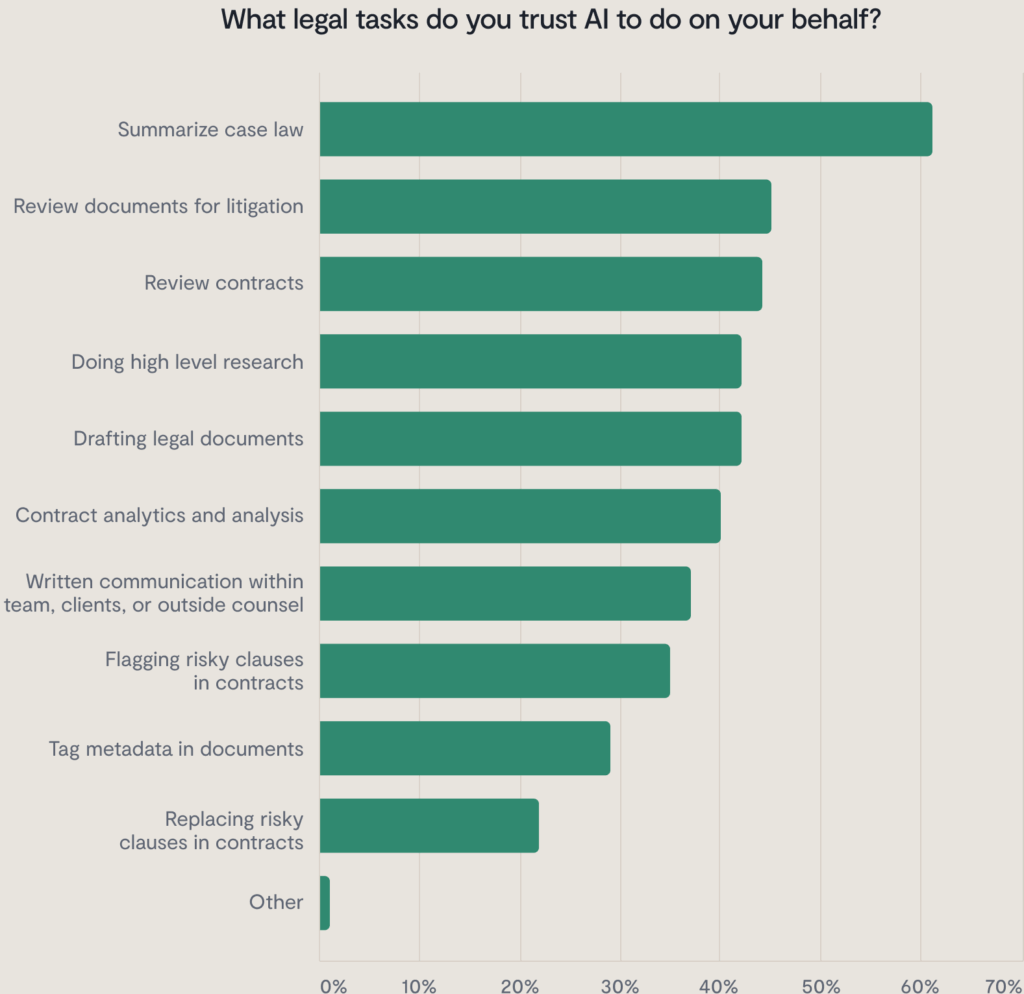
Every workflow has its friction points, which is why we’re starting to see more organizations turn to AI for support in specific areas. Between 2024 and 2025, we saw a notable rise in legal teams turning to AI for tasks like contract analysis, case law summarization, and contract review, suggesting that these areas are where many teams feel the greatest time pressure or operational drag.
Step 2: Evaluate your current technology infrastructure
Before you make your legal AI software selection, you need to fully understand the existing systems and processes you’re working with. What document management platforms do you use? How is your data organized? What integrations are essential?
This evaluation will help you determine whether you need a standalone AI solution or one that integrates with your existing tech stack. Point solutions can be a good fit when you’re solving a clearly defined problem and need to move quickly. Integrated solutions, on the other hand, are often better suited for teams looking to embed AI across multiple stages of the workflow. Either way, this step will also surface any infrastructure improvements needed before implementation.
Step 3: Define success metrics
Then, it’s time to define what success looks like for your organization. Is it reducing contract review time by 40%? Improving accuracy in compliance checks? Freeing up 20 hours per week for strategic work?
Establish clear, measurable goals before you start evaluating tools. This will help you compare solutions objectively and measure ROI after implementation. You can also check industry benchmarks to see how your organization’s efficiency compares to others.
Step 4: Research and shortlist solutions
Now you’re ready to explore available AI tools for lawyers. It’s important to narrow your search to solutions designed specifically for legal work rather than generic AI platforms. Legal-specific tools understand the unique requirements of your profession. They’re built to handle legal document structures, recognize legal terminology, and comply with attorney-client privilege and other confidentiality requirements that generic AI tools might not address.
Create a shortlist of 3-5 tools that align with your pain points and technical requirements. Don’t get overwhelmed by trying to evaluate every option in the market.
Step 5: Conduct thorough evaluations
Smita Rahjmohan, Associate General Counsel for Artificial Intelligence at Intuit says, “AI has made software architects of some lawyers,” due to the amount of technical involvement and knowledge required from legal to implement AI software.
Rahjmohan goes on to introduce a smart framework she uses for legal AI tool evaluation: The 4 Cs—Criticality, Confidentiality, Complexity, and Comfort
Let’s take a deeper dive into this framework to help you understand what to look for when evaluating AI tools.
Key evaluation criteria for legal AI tools: The 4 Cs framework
Criticality: How high are the stakes if the AI is wrong?
The first question you should ask about any legal AI tool is: What happens if it makes a mistake?
For high-stakes tasks like litigation strategy or regulatory compliance, AI errors can have serious consequences. In these scenarios, you need tools with exceptional accuracy rates and robust verification processes. You might also want to limit AI to supportive roles rather than decision-making ones.
For lower-risk, high-volume tasks like initial contract screening or document organization, you can tolerate some errors in exchange for significant time savings. The key is matching the tool’s reliability with the task’s level of importance.
Consider this framework:
- High criticality: AI assists humans who make final decisions
- Medium criticality: AI makes recommendations with human oversight
- Low criticality: AI handles routine tasks with periodic human review
Confidentiality: Is your data safe?
Legal work involves some of the most sensitive information in business, and maintaining confidentiality is both an ethical obligation and a legal requirement.
When evaluating legal AI tools, you need to understand exactly how they will handle your data. Where will it be stored? Who has access to it? How is it encrypted? Is it used to train the AI model? Can it be deleted upon request?
Look for tools that offer:
- End-to-end encryption
- Data residency controls
- Clear data usage policies
- SOC 2 Type II certification or equivalent
- The ability to use the tool without sharing sensitive data with the vendor
Have a detailed conversation with the vendor about their security practices and how they will specifically apply to your organization’s instance, rather than just reading their privacy policy.
Complexity: Can you understand the tool’s decision-making?
Here’s a question that keeps many legal professionals up at night: if I can’t explain how the AI reached its conclusion, how can I defend it to a client or in court?
Some AI tools operate as “black boxes,” providing results but no insight into their reasoning process. Others offer transparency features that explain their decision-making logic.
For legal work, explainability isn’t just nice to have—It’s essential. You need to understand why the AI flagged a particular contract clause as risky or why it recommended a specific legal strategy.
That’s why it’s important to evaluate tools based on:
- How well it communicates the rationale behind its outputs
- Whether you can trace decisions back to specific data points
- How well its logic aligns with legal reasoning
- Whether its explanations would satisfy your clients or regulatory requirements
Comfort: How confident are you using it?
The final C is perhaps the most personal: How comfortable are you and your team with using the tool?
You can measure comfort through several factors:
- Ease of use: Is the interface intuitive for legal professionals?
- Reliability: Does the tool consistently perform as expected?
- Support: Can you get help when needed?
- Training: How much time will your team need to become proficient?
A tool might score high on the other three Cs, but if your team isn’t comfortable using it, adoption will fail. During your evaluation, pay attention to your team’s reactions during demos and trial periods to ensure it’s the right solution for everyone.
Cost, ROI, and total cost of ownership considerations
Let’s talk about the financial side of evaluating legal AI tools. The upfront price is just one piece of the puzzle. To make a well-informed decision, it’s critical to assess the total cost of ownership and the potential return on investment.
Understanding true costs
When evaluating legal AI tools, consider these cost components:
- Direct costs include software licensing fees, implementation services, and ongoing support. These are usually the most visible costs and easiest to budget for.
- Indirect costs are often larger but less obvious. They include staff time for training, system integration expenses, data preparation costs, and potential productivity losses during the transition period.
- Opportunity costs represent what your team could accomplish with the time currently spent on manual tasks. If your lawyers are spending 20 hours per week on routine contract reviews, what strategic, high-impact work could they be doing instead? And if other legal teams are already leveraging AI tools to reclaim that time, what competitive advantage are they gaining that you’re not?
Calculating return on investment
The best way to measure ROI for legal AI tools is to focus on quantifiable benefits:
- Time savings: Calculate how many hours per week the tool could save your team, then multiply by your average billable rate or internal cost per hour. For example, Camuda’s Legal Operations Manager reports that using AI legal software has saved their time by 75%, freeing them up to focus on more strategic tasks.
- Accuracy improvements: Estimate the cost of errors in your current process (missed deadlines, compliance issues, contract disputes) and factor in how AI might reduce these risks.
- Capacity increases: If AI tools free up your team’s time, you might be able to take on more clients or higher-value work without hiring additional staff.
- Risk reduction: Consider the value of better compliance, reduced contract risks, or improved decision-making.
Planning for long-term costs
When evaluating a legal AI tool, it’s important to think beyond your immediate needs and budget. These tools often come with long-term considerations—such as ongoing training, system maintenance, and the potential need for additional licenses as your team grows. Be sure to factor in these future costs when making your decision.
Scalability is also key. A tool that fits your current team size may become cost-prohibitive as you expand or, on the flip side, may offer more favorable pricing at scale. Understanding how pricing and performance evolve with growth will help you choose a solution that supports your long-term strategy.
Implementation best practices
Successfully implementing legal AI tools requires more than just purchasing software and hoping for the best. Here are the legal AI tool best practices that separate successful implementations from expensive failures:
Do your homework first
Before diving in, make sure your data is clean, your processes are well documented, and your team is aligned on implementation goals. Without this foundation, AI tools won’t reach their full potential, and implementation risks increase significantly. Taking these steps will ensure you’re ready to use legal AI tools across your organization and pave the way for success.
Start small and scale gradually
Rather than trying to revolutionize your entire organization overnight, begin with a pilot project. Choose a specific use case where AI can deliver clear value, like automating routine NDA reviews or streamlining due diligence document analysis.
This approach allows you to learn from real experience, refine your processes, and build confidence before expanding to more complex applications. It also makes it easier to demonstrate ROI to stakeholders who might be skeptical about AI adoption.
Establish clear governance and oversight protocols
Create formal processes for AI decision-making oversight. Who reviews AI-generated outputs before they go to clients? What’s your escalation process when the AI flags something unusual? How do you document AI-assisted work for audit trails?
These protocols should include regular accuracy spot-checks, clear approval workflows, and documentation standards that satisfy both internal quality control and external regulatory requirements.
Create comprehensive training and onboarding programs
Getting stakeholder buy-in is just the first step. After you’ve chosen an AI legal tool, your team needs structured training to use it effectively. Many implementations fail not because people don’t want to use the tool, but because they don’t know how to use it properly.
Effective AI tool training goes beyond basic feature walkthroughs. Your team needs to understand when to use the AI, when not to use it, how to interpret its outputs, and how to maintain quality control. They also need to learn new workflows that incorporate AI assistance while maintaining professional standards.
Develop role-specific training programs that address the unique ways different team members will interact with the tool. A general counsel using AI for case law research has a completely different use case than a contract manager automating document workflows. Focus on hands-on practice with real examples from your practice rather than theoretical scenarios.
Don’t assume training ends after the initial rollout. Plan for ongoing education as your team discovers new use cases and develops more sophisticated ways to leverage the technology.
Monitor and measure performance
Once your AI tool is live, track its performance against the success metrics you defined earlier. Are you achieving the time savings you expected? Is accuracy meeting your standards? Is your team using the tool consistently?
Regular performance reviews help you optimize your AI implementation and make the case for expanding to additional use cases.
Top legal AI tools by category
Legal AI is a rapidly evolving space, but some tools have emerged as clear leaders. Below are the top platforms across key categories, chosen for their widespread adoption, strong user feedback, and impact on legal work.
Comprehensive platforms
These tools offer an all-in-one suite for contract review, eDiscovery, document automation, and more.
Evisort (Workday CLM)
Evisort is an AI-native contract lifecycle management platform for medium to large enterprises that delivers accurate contract data extraction and powerful AI search. It automates the full contract lifecycle—from intake to post-signature insights—with features like Document X-Ray and natural language querying, helping legal teams streamline workflows and gain actionable contract intelligence.
Ironclad
Ironclad is an enterprise-grade contract lifecycle management platform with embedded AI that automates metadata extraction, redlining, and clause flagging. Its AI Playbooks enforce customized contract standards, while Smart Import simplifies contract intake. Designed for high-volume teams, Ironclad accelerates contract approvals, improves collaboration, and provides real-time analytics to optimize contract processes.
Sirion
Sirion is an AI-native contract lifecycle management platform that excels at managing complex vendor relationships beyond contract signature. It uses generative and extraction AI to automate contract authoring, negotiation, obligation tracking, and performance management. Sirion’s AI-powered dashboards and playbook-driven workflows provide real-time insights that support legal, procurement, and finance teams in large enterprises seeking scalable, data-rich CLM solutions.
Legal research
These tools help lawyers find case law, statutes, and legal insights faster using AI.
Lexis+ AI
Lexis+ combines extensive legal content with generative AI tools designed for fast, precise legal research. Its conversational search and AI-generated case summaries help lawyers quickly find relevant case law, statutes, and secondary sources. Lexis+ is best suited for legal professionals who want a trusted research platform enhanced by AI to uncover deeper insights and improve drafting efficiency.
Westlaw Precision
Westlaw Precision enhances legal research with AI-powered natural language search, advanced filters, and KeyCite citation validation. It delivers highly relevant case law, statutes, and precedents with built-in tools to detect overruling risks. Trusted by law firms and corporate legal departments, Westlaw Precision excels at providing accurate, court-ready research combined with AI-driven insights for informed litigation strategy.
Contract review and analysis
These tools focus on analyzing, redlining, and extracting data from contracts.
Harvey AI
Harvey AI uses GPT-based generative AI tailored to legal workflows to assist law firms and in-house teams with contract review, risk spotting, redlining, and summarization. It applies advanced legal reasoning beyond keyword search to identify subtle issues and accelerate due diligence. Harvey is ideal for legal professionals seeking AI that enhances research and drafting accuracy while reducing manual review time.
Litera Kira
Litera Kira uses machine learning to automate the identification and extraction of key clauses and data points from contracts. It excels in large-scale document review and due diligence, helping legal teams quickly analyze high volumes of contracts with accuracy. Kira is ideal for law firms and corporate teams handling M&A and compliance audits, offering customizable models and strong integration capabilities for seamless workflows.
Luminance
Luminance offers legal-grade AI that supports the full contract lifecycle, from drafting and negotiation to post-signature analysis. Its unique “Panel of Judges” architecture combines multiple AI models to deliver advanced legal reasoning and accurate contract review. The platform is trusted by global law firms and legal teams managing complex, high-volume contracts, providing powerful clause classification, anomaly detection, and risk spotting.
Spellbook
Spellbook is a GPT-4-powered contract drafting assistant that integrates directly into Microsoft Word. It provides real-time clause suggestions, risk identification, and automated redlining, helping legal teams speed up contract drafting and negotiation. Spellbook is best suited for law firms and in-house counsel seeking AI-powered drafting enhancements without adopting a full CLM system.
Clio Duo
Clio Duo is an AI assistant embedded within the Clio legal practice management platform, automating client intake, communication, and task management through natural language processing. It helps small law firms and solo practitioners streamline administrative workflows by generating correspondence, summarizing case information, and managing to-do lists, all within the familiar Clio environment.
Automation
These tools help legal teams automate routine tasks like document generation, approvals, and workflows.
MyCase
MyCase is a cloud-based legal practice management platform designed for small to mid-sized firms, combining case management with built-in automation tools. It helps teams automate routine tasks like reminders, billing, and client communications while also organizing cases efficiently. MyCase is ideal for smaller firms looking for an affordable, user-friendly solution with workflow automation capabilities.
Thomson Reuters CoCounsel
CoCounsel leverages GPT-4 AI to automate contract drafting, review, risk spotting, and legal research. Integrated with Thomson Reuters products like Westlaw, it provides natural language queries and document generation in a single platform. CoCounsel is designed for law firms and corporate legal teams seeking a powerful AI assistant that combines contract automation with advanced research capabilities.
Data and analytics
These tools surface insights from legal data to guide decision-making and performance tracking.
Lex Machina
Lex Machina uses natural language processing and machine learning to extract litigation data and deliver insights into case outcomes, judge behavior, and attorney performance. It supports data-driven strategies for law firms and legal teams by analyzing trends and forecasting litigation results. Lex Machina integrates smoothly with the LexisNexis ecosystem to enhance research and litigation planning.
Premonition
Premonition offers predictive analytics by mining extensive court data to forecast case outcomes, attorney win rates, and judge tendencies. It is designed for legal departments and insurers seeking data-backed insights to guide litigation strategy and counsel selection. Premonition provides one of the largest litigation databases, supporting smarter legal decision-making through AI-driven performance analytics.
Start exploring AI legal software
The legal profession is at an inflection point. AI tools offer unprecedented opportunities to streamline routine work, improve accuracy, and free up time for the strategic, relationship-building, and complex problem-solving work that defines great legal practice.
But success isn’t guaranteed. It requires thoughtful evaluation, careful implementation, and a commitment to change management. By using frameworks like the 4 Cs and avoiding common pitfalls, legal teams can confidently navigate the AI landscape and select tools that genuinely enhance their practice. To evaluate legal AI tools with confidence, use our comprehensive checklist below.
Legal AI tool evaluation checklist
1. Criticality: How high are the stakes if the AI is wrong?
Task assessment:
- I have identified the specific tasks I want to use AI for.
- I have categorized each task by risk level (high/medium/low criticality).
- I have evaluated the potential consequences of AI errors for each task type.
- I have determined which tasks could result in malpractice liability if done incorrectly.
- I have assessed which tasks could harm client interests if AI makes mistakes.
Risk mitigation for high-stakes tasks:
- I will review all AI outputs before using them, especially for high-criticality tasks.
- I have processes for verifying accuracy and completeness across different task types.
- I will apply my own legal judgment to all AI recommendations.
- I have identified which tasks require human-only decision-making.
- I will maintain appropriate documentation of AI use and review for all tasks.
Appropriate use guidelines:
- Administrative and formatting tasks are approved for AI use with minimal review.
- Research and analysis tasks will have appropriate human oversight.
- Court filings, legal advice, and compliance matters will have thorough human review.
- I understand which tasks are too critical for current AI capabilities.
- I have clear internal policies about AI use by task criticality level.
Key questions:
- I have identified which tasks require legal judgment that only I can provide.
- I can explain what happens if this AI tool makes an error on different types of tasks.
- I have identified which tasks could result in malpractice liability if done incorrectly.
- I have determined for which tasks errors would harm my client’s interests.
- I can easily verify and correct AI outputs across all intended uses.
2. Confidentiality: Is your data safe?
Data security requirements:
- The tool provides end-to-end encryption for data transmission.
- The tool provides secure data storage with appropriate access controls.
- The tool complies with relevant privacy regulations (GDPR, CCPA).
- The vendor has clear data retention and deletion policies.
- The vendor conducts regular security audits and maintains certifications.
Training data protections:
- The vendor explicitly states they don’t train on your data.
- Private model deployment options are available.
- The vendor agreement includes clear data usage policies.
- I have the ability to opt out of any data sharing.
- Local or on-premise deployment options are available.
Client confidentiality safeguards:
- Attorney-client privilege protections are maintained.
- The vendor does not share data with third parties.
- I have the ability to anonymize or redact sensitive information.
- The tool provides clear audit trails for data access.
- The vendor has incident response procedures for data breaches.
Key questions:
- I know where my data is stored and who has access to it.
- I have confirmed whether my confidential information will be used to train AI models.
- I understand how the vendor protects attorney-client privilege.
- I know what happens to my data if I stop using the service.
- I can get written guarantees about data protection from the vendor.
3. Complexity: Can you understand the tool’s decision-making?
Transparency and explainability:
- The AI provides reasoning for its outputs.
- Citations and sources are clearly identified by the tool.
- The tool includes confidence levels or uncertainty indicators.
- The decision-making process is documented.
- I have the ability to trace AI logic step-by-step.
User understanding requirements:
- The tool produces outputs in clear, understandable language.
- Technical jargon is minimized or explained by the tool.
- Training materials help me understand AI capabilities.
- The support team can explain AI decision-making when needed.
- I receive regular updates on AI model changes.
Professional competence factors:
- I can explain AI outputs to my clients.
- I understand the tool’s limitations.
- I know when to question AI recommendations.
- I can verify AI accuracy independently.
- Training is available to help me maintain competence.
Key questions:
- I can explain to a client how this AI reached its conclusion.
- I understand the tool’s limitations and potential biases.
- I can independently verify the AI’s work.
- I will be able to defend my use of this tool if questioned.
- I have adequate training to use this tool competently.
4. Comfort: How confident are you using it?
User experience and interface:
- The tool has an intuitive interface that matches my workflow.
- The tool has a minimal learning curve for basic functions.
- The vendor provides clear documentation and help resources.
- The vendor offers responsive customer support.
- Regular training opportunities are available.
Integration and workflow:
- The tool integrates with my existing legal software.
- The tool fits naturally into my current processes.
- My team members can adopt it easily.
- The tool doesn’t disrupt client service delivery.
- The tool provides measurable productivity benefits.
Trust and reliability:
- The tool demonstrates consistent, reliable performance.
- The vendor has a good reputation and track record.
- There are positive reviews from similar law firms.
- The vendor has a clear roadmap for future improvements.
- The vendor maintains transparent communication about issues.
Key questions:
- I feel confident using this tool in my daily practice.
- My team will embrace this technology rather than resist it.
- I can rely on this tool to work when I need it.
- Using this tool feels natural rather than forced.
- I am excited about the possibilities rather than anxious about the risks.
Final evaluation:
- This tool passes all 4 Cs at an acceptable level.
- There are no red flags that should pause adoption.
- I have identified what safeguards I will put in place to mitigate risks.
- I have a plan for how I will monitor and evaluate ongoing performance.
Ironclad is not a law firm, and this post does not constitute or contain legal advice. To evaluate the accuracy, sufficiency, or reliability of the ideas and guidance reflected here, or the applicability of these materials to your business, you should consult with a licensed attorney.


