



Building vs. Buying CLM in the AI Era
Building a custom CLM seems enticing, especially for enterprises with complex use cases or higher data security requirements. But what does it really take to build from scratch? Here’s what legal teams need to know before deciding to build their own CLM.

Want more content like this? Sign up for our monthly newsletter.
To build or to buy, that is the question—at least for people deciding how to approach their next CLM.
AI development tools make custom software feel more accessible than ever, and in some ways, that’s true. There’s more that goes into spinning up and maintaining a bespoke legal tool than vibe-coding, though.
We’re going to walk through everything you need to consider between building and buying a CLM, what costs and maintenance you’ll carry for each option, and an approach that blends the best of both options.
What it’s like to build a custom enterprise CLM in 2026
AI tools are changing the software development landscape. McKinsey research found that AI tools lead to 35-45% faster code generation, up to 50% time saved on code documentation, and a 25-30% increase in developers’ productivity. Looking ahead, there are estimates that AI workflows and agents could boost development productivity by up to 20X.
At the same time, legal departments have to absorb more with less. CLOC’s 2026 State of the Industry Report found that workload demand is surging in areas like regulatory compliance and cybersecurity, yet only 32% of departments expect headcount growth.
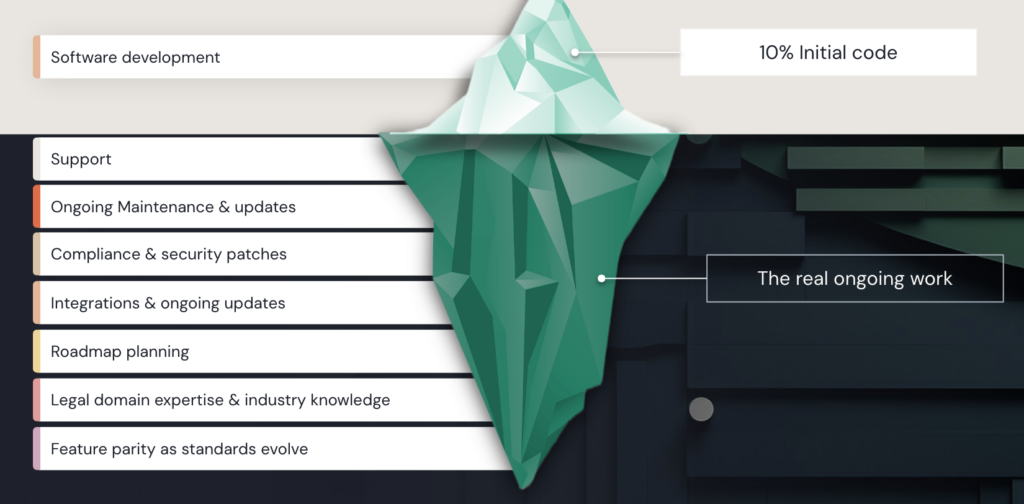
Surely with all that time savings from AI, there’s room in the schedule to create a custom CLM? Maybe, but there’s more that goes into creating and maintaining a CLM than the code alone. Building a custom enterprise CLM is an iceberg problem—the initial software development is the 10% above water, but the other 90% of ongoing work lies beneath the surface.
Building and maintaining your custom CLM requires:
- Ongoing maintenance and updates: Every model update, UI change, or underlying API shift requires your team to respond. There’s no vendor pushing fixes—that’s you now, indefinitely.
- Compliance and security patches: Data privacy laws change, audit requirements evolve, and new regulations emerge. Keeping a legal tool compliant is a permanent responsibility.
- Integrations and ongoing upkeep: Your CLM needs to talk to your CRM, ERP, e-signature tools, and whatever comes next. Each of those connections requires maintenance every time one of those systems changes.
- Support: Someone has to field questions, troubleshoot issues, and train new users. With an internal build, that someone is almost always already doing three other jobs.
- Roadmap planning: Legal workflows don’t stay static. New contract types, new business lines, and new requirements lead to constant reworking.
- Legal domain expertise and industry knowledge: Purpose-built legal AI learns across industries. That’s not something you can replicate quickly, and it needs to stay current as market standards evolve.
- Feature parity as standards evolve: The legal tech space is moving fast. Keeping an internal tool competitive with what dedicated platforms are shipping takes continuous investment.
How to pressure-test the build vs. buy decision
Unless you’ve built a custom CLM in the past, it’s hard to get a full picture of what goes into it and how it may (or may not) fit your current needs. Here are the main considerations that determine what route is best for your organization.
Company size
A key trend that arose from this year’s Contracting Benchmark Report is that priorities and outcomes vary between organizations of different sizes.
For example, benchmark data shows that enterprises that accepted 14% longer activation timelines achieved the strongest automation gains in the dataset, reducing legal involvement by 14%. Since larger organizations can see exponential increases in approval layers and cross-functional involvement, it makes sense for them to slow down and create more complex systems.
During the same time frame, small and medium-sized businesses cut their average days to sign by the highest rates in the benchmark report. These organizations might value speed, simplicity, and quick wins more than their enterprise counterparts.
Naturally, these different approaches impact the build vs. buy decision. What makes sense for an enterprise with complex governance requirements looks very different from what makes sense for a mid-market team trying to move fast.
| The build appeal | The build reality | |
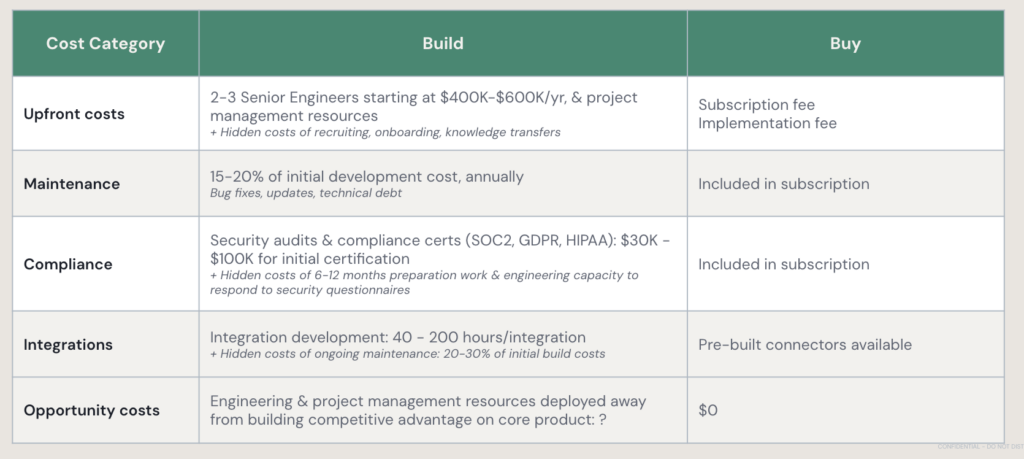
| Enterprise | Non-negotiable security requirements, complex data governance, and use cases that don’t match off-the-shelf solutions. | Compliance certification runs $30K–$100K with 6–12 months of prep. Integrations, multi-jurisdiction requirements, and approval chains compound each other in ways that take years to build well. |
| Mid-market | Enterprise software feels out of reach; a custom tool seems cheaper. | Maintenance runs 15–20% of the build cost annually. Integrations take 40–200 engineering hours each to build, plus ongoing upkeep. |
| Small business | A lightweight custom tool feels simpler than learning a full platform. | Small teams have the least capacity for ongoing maintenance. When the person who built the tool leaves, it can degrade over time. AI lowers the floor to start building, but it doesn’t change the ownership problem. |
Industry
Your industry shapes the build vs. buy decision as much as your company size does. External pressures like regulations or internal pushes for speed change what you’re looking for and what you’re willing to compromise on.
A few things to consider based on your industry:
- Heavily regulated industries (financial services, biotech, pharma, aerospace): Legal involvement rates run higher here, and compliance requirements are non-negotiable and continuously evolving. Building means owning every regulatory update indefinitely. Generic AI models trained on general internet data also tend to lack the industry-specific knowledge that purpose-built solutions have spent years developing.
- High-volume commercial teams: Speed and consistency are the competitive variables. Building slows both down, at least initially, so you have to weigh that pause. The leading performers in this category are layering AI onto existing governance, not building governance from scratch.
- Industries under external pressure (government, real estate, automotive): Market volatility and high counterparty paper volumes make governance stability more important, not less. A homegrown tool under active development is the opposite of a stable governance foundation.
Before you decide, ask yourself:
- Have you mapped how your regulatory requirements might change over the next few years? With those changes, who owns keeping a homegrown tool up to date?
- Have you compared your requirements against what configurable platforms can handle today? If so, where are those gaps, and how critical are the differences?
Speed to value
When you’re considering building a CLM, there are two separate timelines to consider: the time to build it, and the time to get everyone using it. If you’re under pressure to deliver results quickly, you’ll have to decide if you can afford both legs of the build journey.
AI has made the gap between idea and prototype smaller, but not necessarily the space between prototype and fully adopted, reliable, and integrated CLM. That gap is harder to prompt away because it’s as much a people project as a technical one.
Across industries, company sizes, and AI maturity, most organizations take about six months to move from CLM implementation to meaningful value. That number has stayed consistent, too, with Ironclad users taking 180 days to launch their first ten workflows in 2024 and 178 to do the same in 2025.
To be fair, buying something doesn’t make adoption automatic, either. No matter the team, tech can only do so much. The work required to define rules, design workflows, and embed governance takes time. Any new platform requires training, documentation, and internal champions to stick. The difference is that with a purpose-built solution, the UX work and onboarding resources are ready to go on day one.
Before you decide, ask yourself:
- What’s your realistic timeline from “working prototype” to “the whole team uses this reliably under real conditions”?
- How much of your build estimate assumes things go smoothly, and what happens if they don’t?
Customization and use cases
The ability to customize a CLM exactly to your specifications might be the biggest draw for building, especially for enterprises with multiple business units or complex routing.
Legal operations across every organization have a lot of the same building blocks, though, like intake, routing, redlining, approval, storage, and renewal tracking. When you break it down into its core components, your contracting foundation may not be unique enough to justify building and maintaining the entire infrastructure to support it.
Before you decide, ask yourself:
- Have you done a detailed comparison of what you’d need to build versus what a configurable platform could handle, or do you need to do a more thorough CLM evaluation?
- Is the use case genuinely a source of competitive differentiation, or is it contracting infrastructure that needs to work well but doesn’t need to be proprietary?
- Could you get 90% of the customization value through configuration, and build the remaining 10% as a layer on top of a purchased foundation?
Institutional knowledge and skills
Engineering capacity and legal domain expertise are two different things, and building legal ops tools requires both. Some teams genuinely have this combination of strong in-house engineers who understand legal workflows deeply. Before you build, you have to understand whether that bandwidth extends beyond the initial build.
Before you decide, ask yourself:
- Does your engineering capacity match the long-term maintenance demands, not just the initial build?
- What’s the plan for maintaining and upgrading your CLM as the AI landscape changes, and who specifically owns that work?
- What happens to the tool if the people who built it leave?
Building environment
Most build decisions get made by asking whether the team can ship v1. What you really need to ask is whether the organization can own, maintain, and evolve the tool for years through team turnover, regulatory changes, and a rapidly shifting AI landscape.
A few things the initial build proposal may forget:
- The data quality problem. AI models are only as good as their training data. Unstructured legacy contracts or inconsistent metadata can significantly limit what a custom CLM can do before you’ve done significant cleanup work.
- Model training gaps. Clean training data is one thing, but relevant training material is another. Purpose-built legal LLMs constantly learn from real-world negotiations, fallback language, and playbooks from thousands of users and billions of contracts; the things generic models never see. An in-house tool can learn from your institutional context over time, but it starts at a deficit from day one versus established legal AI. The gap shows up in how reliably the tool can recognize your clauses, risks, and positions to accelerate contract negotiations.
- Sponsorship for year two. Internal support for the initial build is usually easier to secure than support for ongoing maintenance. Going in with a clear maintenance plan and committed sponsorship beyond launch makes the build path substantially more viable.
- Security and compliance posture. A homegrown enterprise AI tool needs your security infrastructure to be already mature enough to support it. Where that foundation stands determines whether this is a straightforward requirement or something to improve first.
Before you decide, ask yourself:
- Is your engineering team stable enough to own this long-term, including through team changes and shifting requirements?
- How clean and structured is your contract data right now? If it needs work before it’s model-ready, what does that actually take?
- Does your team have access to the volume and variety of real-world contracting data to train an AI model to perform reliably?
- Who’s the internal sponsor for ongoing maintenance, and is that commitment solid enough to survive a reorg?
Hidden costs of building enterprise CLM
New build homes and fixer-uppers are both viable options, but for different people at different times. Building vs. buying a CLM is much the same in that list price versus the actual total cost to own looks different at day one, year one, and beyond.
On day one, building a CLM can look more affordable than buying one. Especially if your engineers can use AI to speed up the process. However, there are hidden costs to building and managing your own CLM that come around later. Fast forward a few years, and maintenance costs, compliance certifications, and integration upkeep might make your custom CLM more expensive than one off the shelf.
The hardest line item to quantify is opportunity cost. Engineering resources spent on contracting infrastructure are not building your core product or competitive advantage. For most organizations, contracting needs to work well, but it doesn’t need to be proprietary.
When it makes sense to DIY your CLM
As long as teams have thought through the considerations before building a CLM, there are scenarios where it is the best fit.
You might choose to build a CLM if:
- Your use case doesn’t exist off the shelf: The contracting problem you’re solving doesn’t exist in any platform’s roadmap because it’s specific enough to your business that no vendor has built for it.
- You have the capabilities to own it long-term: Stable senior engineering resources, legal domain expertise in-house, and contract data that’s clean enough to train or fine-tune a model on.
- Contracting is a source of competitive differentiation for your business: Usually, contracting is an infrastructure that needs to work well, but stays behind the scenes. A fintech company whose entire business model runs on high-volume, highly customized lending agreements, or a defense contractor navigating unique compliance frameworks that no off-the-shelf solution has addressed, might have legitimate reasons to own the stack.
There’s a third option: buying and building
Up to this point, we’ve juxtaposed building a CLM or buying one. Here’s what it looks like to do both.
Imagine a large enterprise managing tens of thousands of contracts across multiple business lines. It’s enough volume that answering basic portfolio questions like “where are our liability risks” or “which customers have monetizable renewal clauses” requires days of manual work, if it’s possible at all.
First, they buy a CLM as the system of record to handle workflow, governance, compliance, and integrations. Then they build a custom intelligence layer on top that connects contract data to their CRM, product usage data, and revenue reporting. The result is executives asking natural language questions across the full picture without accessing individual platforms. The custom layer is what makes it feel like theirs, while the foundation is what makes it possible without a massive in-house lift.
Why buy and build beats either alone:
- Better data than you could build alone. A platform trained on millions of real enterprise contracts gives your intelligence layer a head start that your own contract history just can’t match.
- Domain expertise that comes with it. It takes years to develop legal AI that understands how contracts behave across deal types and risk thresholds, and you inherit that instead of starting from scratch.
- You can switch between AI models. Purpose-built platforms route the right AI model to the right task. For example, the best model for redlining isn’t necessarily the best model for extraction. As LLM models leapfrog each other, you aren’t locked into one.
- Integrations that make everything smarter. Built-in integrations let you use your data to add context to negotiations, and over time, the insights start to compound. Plus, you don’t have to manage upkeep for the integrations.
- Your custom layer gets smarter as the foundation improves. Clean structured data and automatic upgrades in your CLM foundation all feed into whatever you build on top.
- A roadmap you don’t have to own. The platform keeps improving while your team stays focused on what makes your business different. You’re not choosing between keeping the lights on and building something new.
Understanding the CLM landscape
AI development tools make building a CLM feel more within reach, but a lot of the fundamentals are still the same. You still need to staff it, maintain it, keep it compliant, and own everything that goes wrong with it.
For some organizations, the answer is buy the foundation and build what makes you different. For others, it’s a full buy. For a few, it’s a full build.
Wherever you land, the CLM Buyer’s Guide is a useful next step. It walks through how to evaluate what’s out there, what questions to ask, and how to rightsize your evaluation for your organization’s size and industry. And if you’re building, it’s a solid benchmark for what your custom tool should be able to do.
Ironclad is not a law firm, and this post does not constitute or contain legal advice. To evaluate the accuracy, sufficiency, or reliability of the ideas and guidance reflected here, or the applicability of these materials to your business, you should consult with a licensed attorney.


